Image Encryption and Decryption Online
🔒 Image Encryption Tool — Protect your image files by converting them into encrypted data using military-grade encryption algorithms. The output cannot be viewed without the correct decryption key.
💡 Want to hide data inside images instead? Try our Image Steganography Tool to embed secret messages invisibly within images.
🛡 Privacy First: All processing happens locally in your browser. No uploads, no tracking, no server storage — your images stay private.
🔐 Supported Encryption Algorithms
🔒 All algorithms use PBKDF2 key derivation with 100,000 iterations for passphrase-based encryption.
🔒 Encrypt Image
Select an image to encrypt (PNG, JPEG, GIF, WebP supported)
All encryption runs locally in your browser. No data is sent to any server.
✓ Encryption Successful!
🔓 Decrypt Image
Upload an encrypted file (.enc, .txt) or paste the Base64/Hex string below
OR
✓ Decryption Successful!
🛡 Features
7 Encryption Algorithms
AES-256-GCM, AES-CBC, AES-CTR, ChaCha20, 3DES, Rabbit, and more
All Formats Supported
PNG, JPEG, GIF, BMP, WebP, and more image formats
Password Protection
Optional passkey for additional security layer
Client-Side Processing
All processing happens in your browser - nothing uploaded to servers
Multiple Output Formats
Export as .enc file or copy Base64/Hex string
Fast & Free
Instant encryption/decryption with no file size limits for small images
📄 How Image Encryption Works
Image encryption converts your image data into an unreadable format using cryptographic algorithms like AES (Advanced Encryption Standard). The encrypted output cannot be viewed without the correct decryption key.
Upload your image file (PNG, JPEG, etc.)
Select encryption algorithm and passkey
Data is encrypted using PBKDF2 + cipher
Save as .enc file or copy Base64/Hex
🔐 AES Encryption Process
Your image binary data serves as the Plain text input, combined with your Secret key (passkey). The cipher processes this through multiple rounds of substitution and permutation to produce the encrypted Cipher text.
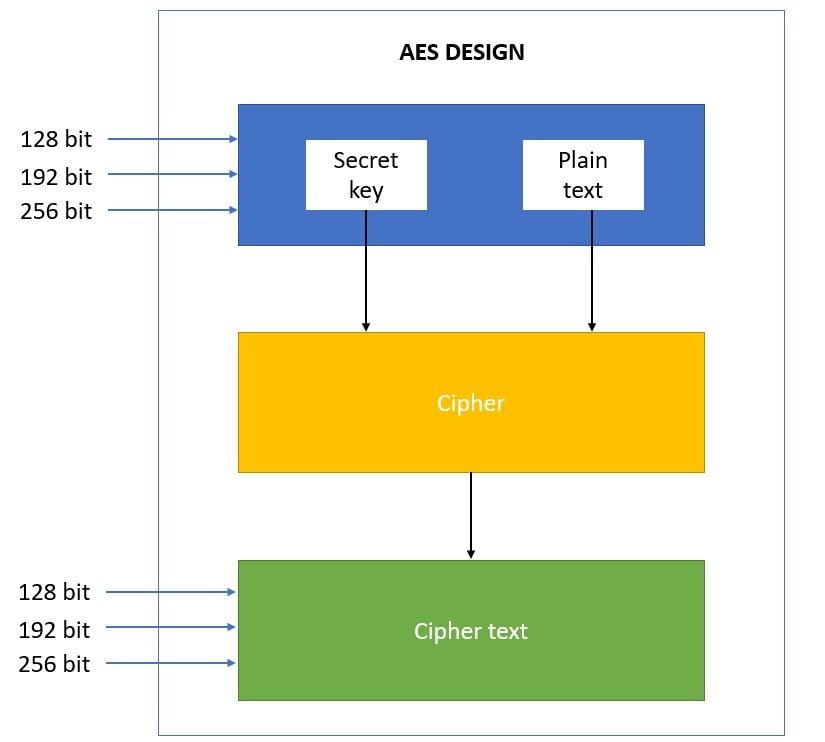
🔒 Security Note: The key size (128, 192, or 256 bit) determines encryption strength. This tool uses AES-256 by default with 100,000 PBKDF2 iterations for maximum security.
💡 Why Encrypt Images?
Keep personal photos secure from unauthorized access
Share sensitive images safely over unsecured channels
Protect confidential documents and screenshots
Encrypt images before uploading to cloud services